Mica is a high-efficiency mathematics and systems language: it compiles to native code for Linux on x86-64 and AArch64, vectors, matrices and tensors are types whose shapes the compiler checks, and the autograd tape is part of the language - which is why AI is one of its core capabilities rather than a library beside it. The Mica extension for VS Code reaches 5.0 together with compiler 7.6, and it opens that compiler to you: every stage of a compilation becomes something you can read, click through and draw, and the program you are writing runs, debugs, profiles and verifies without leaving the editor.
Nothing on these pages is a model of what the compiler might do. Every listing, drawing and number comes from the compiler’s own export of that build, so what you see is what it did.
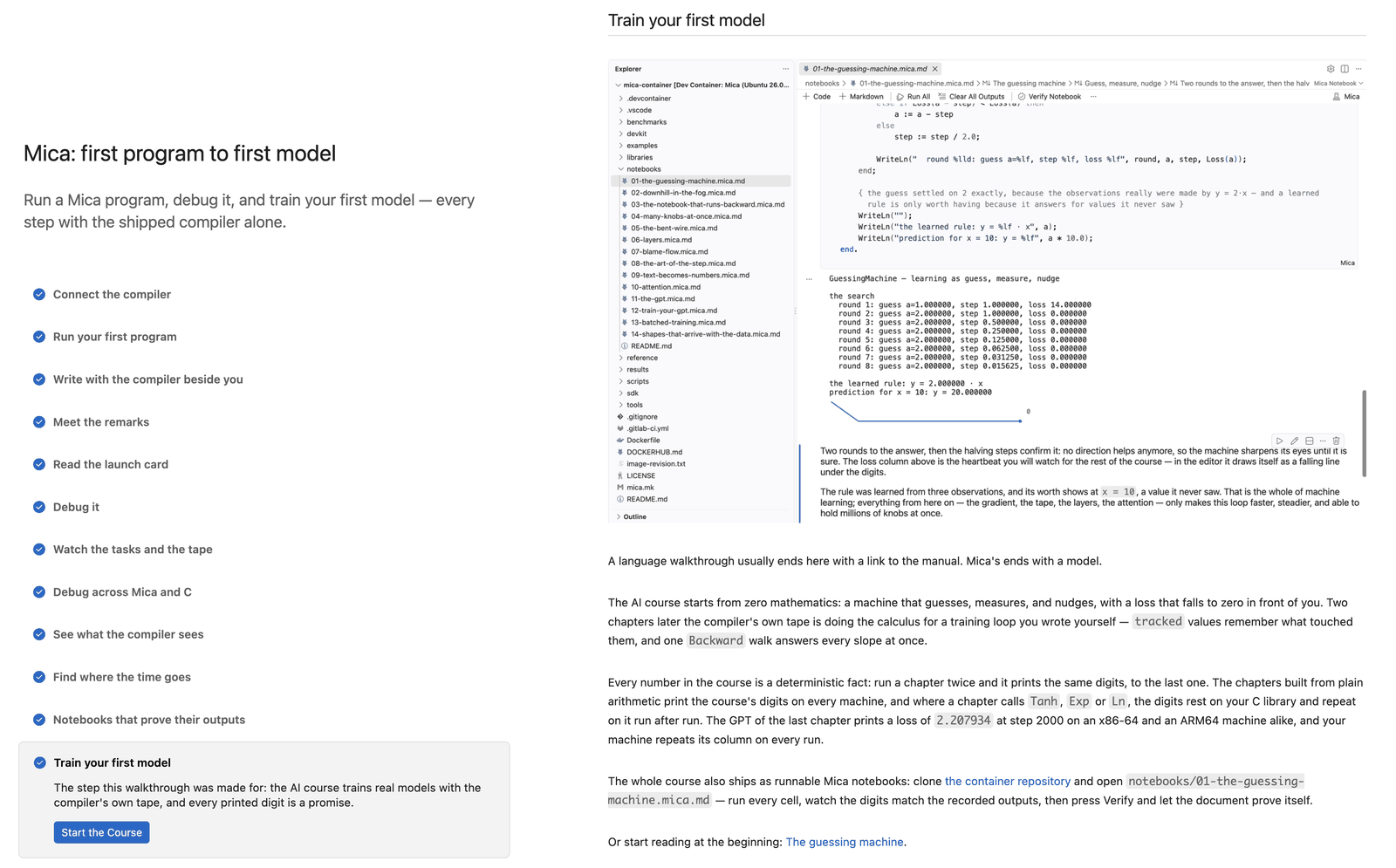
Twelve steps from a first program to a first model
Open the walkthrough Mica: first program to first model from the Welcome page. Its twelve steps are the tour: connect the compiler, run a first program, write with the compiler beside you, meet the remarks, read the launch card, debug, watch the tasks and the autograd tape, debug across Mica and C, see what the compiler sees, find where the time goes, prove a notebook’s outputs, and train a first model. Every step has its button, and every button does what its label says.
See what the compiler sees
Export File compiles a source at the level you pick and opens an index of everything the compiler wrote, in the order its phases ran: the tokens, the syntax tree, the Spectra intermediate code before and after static single assignment, the control flow graph, dominance, liveness, reaching definitions, the placement of every value, the assembly, the optimization ledger. The index says when the export was compiled and where it was written, and every export is compiled from scratch.
Each stage opens as a language of its own, coloured, folded and outlined. A hover over a Spectra operation says what it does in the compiler’s words. Go to Definition jumps from a label to where it stands, and from a source-line number back to your source. Open Export Stage moves to the same function in another stage: from the SSA form to the assembly, for example, where every statement’s comment now leads with its source line number.
Show Control Flow draws a function’s basic blocks and edges beside the listing, loops climbing the right side, jumps and fallthroughs told apart by line and by word, and switches to the dominator tree on request.
Where a function keeps its values
New in 5.0, Show Placement draws what the register allocator and the frame layout decided for one function.
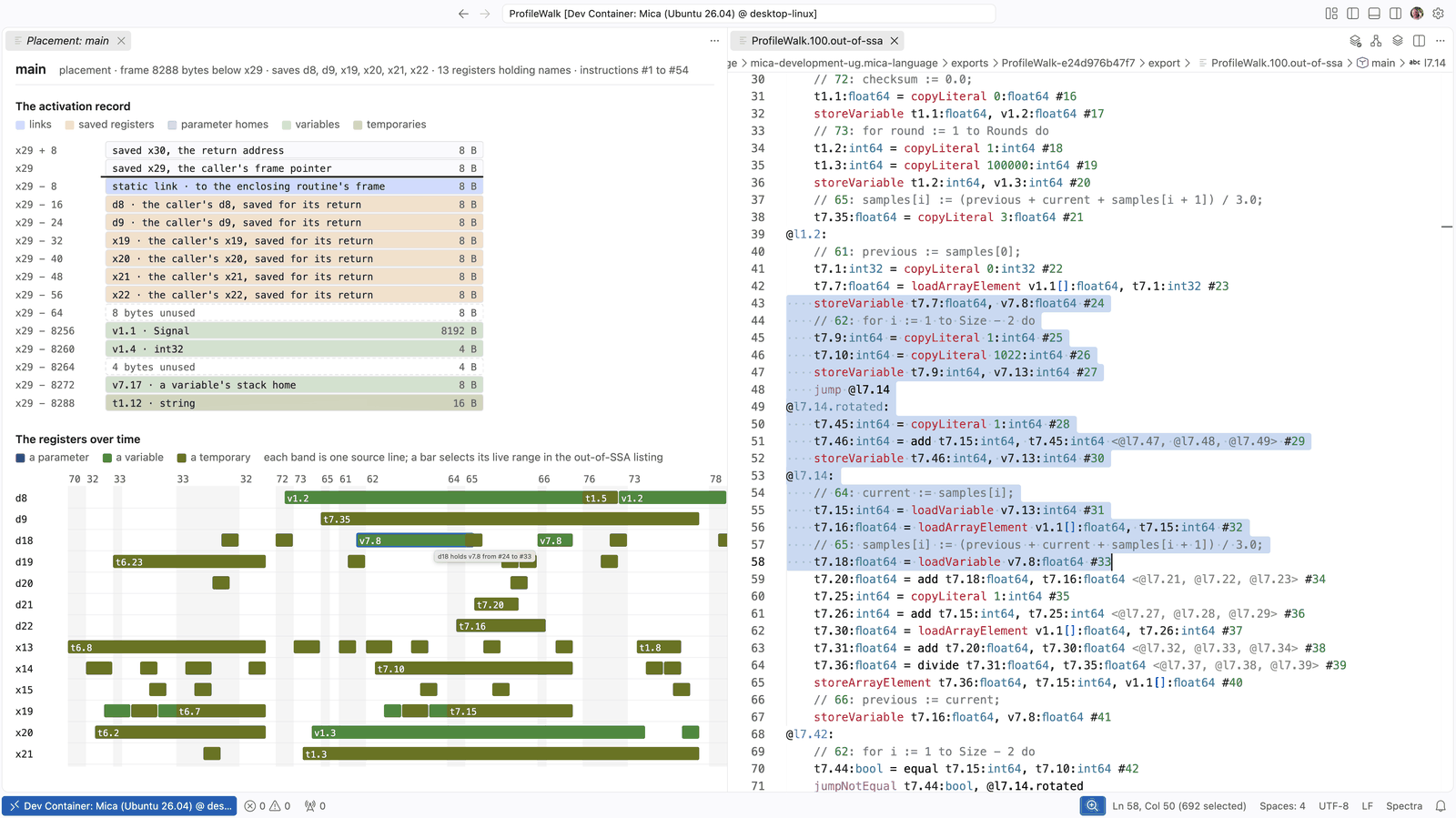
The upper half is the activation record as the prologue builds it: the frame record, the static link, the saved registers exactly where the prologue stores them, and every value that lives in the frame, each at its offset and at the size its type states. The lower half shows the registers over time: one row per register, one bar for each name while it lives there, grouped under the source line each instruction came from. Click a bar and the out-of-SSA listing opens beside it with that name’s whole live range selected.
This is a compiler-construction lecture you can run on your own code. Write a loop, export it at the full optimization level, and watch the allocator keep the running total in one register across the whole loop.
One call stack across Mica and C
A Mica program that links a C library debugs as one program. Set breakpoints in both languages,
step into C and back into Mica, and read one call stack that runs from a Mica routine through
a C function into an exported Mica function, each frame with its variables in its own language.
A function breakpoint on the name C calls, DebugWalk__Clamp, stops in the Mica routine it
names. While a program is stopped, hovering a name like w₁ or α shows its value.
The runtime draws itself
At every stop, the Mica Runtime view draws the program’s task tree and its autograd tape:
which task runs, which are ready, which are parked, and whether a tape window is recording or
has been walked. A running program started with +mica rtp=listen -mica can be attached
without a debugger. You can suspend it, continue it, or cancel a task’s scope and watch its
cleanups run.
Profile to the line
Profile File builds the program with its profiling tables, runs it under valgrind, and writes
each line’s count beside it: 613.2 M instructions · 27.2%, hotter lines in hotter colours,
with the exact count in the hover. The Mica Profile view ranks the procedures, and inlined
routines are still named. The counts repeat on every run, so a change’s effect is the
difference between two profiles. Profile Compile shows where the compiler’s own time went,
phase by phase.
Notebooks that prove their outputs
The AI course ships as Mica notebooks. Each code cell is a complete program, and each output below it is a recorded fact. Verify Notebook runs every cell again and holds the fresh output against the record, digit for digit. When a digit moves, the cell shows the recorded output and this run’s side by side. Verify Notebooks in Folder checks a whole course in one command.
Build, and know where the program is
Right-click a mica.project and choose Mica → Build Release. The project is compiled from
scratch into its own build/release folder, in a terminal that shows the compiler’s command
line and everything it prints. The editor then tells you where the program landed, with
Reveal in Explorer, Copy Path and Run beside it. Build Debug and Clean Build
stand next to it. Mica: Show Build Artifacts lists every folder the editor’s own work left
behind, with where it is and how large it is, and Clean Editor Artifacts removes them in one
go. A project’s own build folder is never touched.
Written with the compiler beside you
While you type, the language server answers from the text on your screen: the outline, hover,
Go to Definition, signature help and the parameter hints follow every keystroke, with auto-save
on or off. Diagnostics arrive on save, at the exact positions the compiler reports them.
Completion in the import section offers the units and the names each one exports, and says
which unit a name comes from. The glyph input turns \alpha into α and w_1 into w₁,
the way the paper wrote the formula.
Getting it
The extension is version 5.0.0 and pairs with compiler 7.6. Install it from the Visual Studio
Marketplace or Open VSX, point mica.languageServer.path at the compiler if it is not on your
PATH, and open the walkthrough.